Sunday, October 30, 2011

Understanding Customer Behavior through PPC data

You should always look for trends when you look at your web metrics data. Focusing on aggregate numbers just doesn't  make sense in any way.  For example knowing that I get 1000 unique visitors to my website in a month wont help me much.  But knowing where they come from, what time of the day, which days of the month (weekends or weekdays), what content they visit, how much they consume of it, is really meaningful.

Always focus on customer behavior rather than aggregate metrics. You can do some cool PPC analysis by applying that principle.
The setup is quite simple. Let's measure how long it takes for someone to convert from the first time they visit your website. The report is called Days to Purchase. Look at the figure below. You'll notice, top right, that it is segmented to show only Paid Traffic.

This data is for a travel website. It might strike you as odd that only 46 percent of the people make a purchase on the same day, simply because airline tickets and hotels and cruises all tend to get more expensive with each passing day. That's odd behavior for Visitors.
OK, let's find out whether we see the same behavior with traffic from other sources. Below figure shows the report for Direct Traffic.


Whoa! With Direct Traffic, 71 percent purchase on the same day. That is normal behavior for Visitors for a travel site. So, what is up with the PPC traffic? Why don't they behave like normal people? If the behavior from PPC traffic is so odd, then how can we treat them better or differently?
These are all great questions, and they're the reason why I recommend this type of analysis. Each traffic stream is unique!
In this case, the travel website took this data and reviewed the landing pages for its PPC campaigns. At the time of the previous report, it was geared toward converting Visitors quickly ("Buy now! Book now! Give us your money, now!").
The first action the marketers took was to soften the calls to action, because they realized a good chunk of the traffic does not want to buy right away. Then the marketers added a new feature, Save Your Itinerary. They realized Visitors would come back, so they might as well make it easy for them.
Finally, the marketers added another feature: "Email me if price goes up by x percent," where x was a number that the Visitors could input when saving an itinerary. This was a very clever move because the travel agency then had the contact information for the Visitors and could email them when the price went up by 10 percent or 20 percent or whatever number the customer input. This caused the customers to return and make a purchase sooner, and the customers were happier because they felt the site was watching out for them.
The net return for closely analyzing PPC customer behavior was that it brought forward Conversions to fewer days to purchase and tripled Conversion Rates. That's not too shabby for a simple segmented report, right?

Wednesday, October 26, 2011

Internal Site Search Analysis and points to consider


Almost all web analytics clicks data is missing one key ingredient: customer intent.


The keywords that people type into search engines such as Google, Bing, and Yahoo! contain a modicum of intent. The real gold is the search engine that you surely have on your website. What? No, you don't? You are the last website on the planet not to have an internal site search engine?


If you directly understand the intent of Visitors on your site, you can better understand the causes for success or failure on your site.


Here's an example. You can look at the top 10 most viewed pages on your site and understand what people who came to your site wanted. How would you know which pages your Visitors wanted to see? If Visitors can't find those pages, then your web analytics tool won't record that action.


One way to overcome the challenge of intent is to look at your internal site search data and see what customers typed into your site search engine. You should perform three clusters of actionable analysis with your internal site search data: site search usage, site search quality, and segmenting.

You need to create customised reports to understand the following:

· What customers typed into your site search engine?
o Report for internal site search keywords usage – broken down by each month
o Where there any seasonal effect or seasonal searches

· Your site Search Usage 
o How much is the search function used - You should find out, out of the total visitors coming to the site – how many visitors actually use this function?

· Internal Site Search Quality
o  Find out whether your site search engine delivers quality results
o Bounce Rate for site search
o Bounce Rate for each keyword searched
o The other way to think about search quality is to measure the number of search results pages that are viewed by the visits so we want  - Results Page Views/Search
o Time After Search (i.e. time spent on our website after doing the search)
o Search Depth (number of pages viewed after searching your site)
o % of Search Refinements (Search Refinements helps understand how Visitors refine their queries to get optimal results)

That wasn't so hard, was it? You can do three simple and effective types of analysis on one of the most valuable sources of data in your possession. So why wait? open your web analytics tool and start creating your customized reports.


Sunday, October 23, 2011

Points to consider when optimising for Google Panda

Google loves awesome content. They also love quality search results. They love big money. Bad search results unfortunately means Google will earn less money as searches will not be relevant to the users query. So if your site is of a lower quality or lower user experience and you rank well, somebody visits your site through a Google search result and they are unhappy, this cost Google money. People are less likely to use Google for their queries and this makes Google sad. So to overcome this situation, Google made some update to their algorithm.

This new update is called Google Panda. So Google Panda is an algorithm change which looks at a handful of changes:

a) Do you have thin or otherwise low quality content?

b) Do you have duplicate content either onsite or cross site?

c) Do you have too many advertisements or affiliate links and their ratio is higher compared to the amount of content on your site?

d) Do you have links from devalued domains?

e) Do you have slow loading pages which impact user experience?

Above are a few things which Panda focuses on when deciding where to rank your sites. So at the end of the day Panda can be summarized in one word and that’s “Usability”. Knowing that Google will continue to look for sites which have the best user experience and will penalize sites which don’t factor the above points, your site will definitely not rank well in this new algorithm update if you don’t start addressing these issues. So revaluate your site and ask yourself the above questions. If answer is yes to anyone of them, you have some SEO work to do my friend.

Sunday, October 9, 2011

Why is SEO important for companies like P&G?

A friend and colleague recently asked me why SEO is important. I sent him to a series of articles I recently wrote that starts with the basics of “What is SEO“.

He read it, and came back asking the same question: “Your article says WHAT Search Engine Optimization is, but… I’m still not sure WHY it’s important, or I’ll rephrase why SEO is important for big companies like P&G. They spend millions of dollars marketing their products, so should they even bother!”
Now I was the one scratching my head. I thought the answer was obvious. But, maybe you have the same question. So I tried approaching the topic from his perspective, and realized there is more he may need to understand about marketing in general.
When a consumer decides to purchase a product there is a typical purchase cycle (see diagram).


Every marketing channel has a different role to play in this purchase cycle. At the highest level, there are 2 types of media; Creative and Directive.
Creative Media:
Creative types of media are intrusive, meaning the advertising is not user initiated.
Common types of creative media would be:
a) newspaper
b) radio
c) television
d) billboards
e) vehicle wraps
f) online advertising
f) etc.
This type of media has many purposes that for the most part revolve around awareness building, creating interest, brand or product positioning, or branding.
Directive Media:
Directive types of media on the other hand are most useful only once the consumer has been made aware of the product and has already recognized they have a need (made possible by creative media channels)
So in reality directive media is user initiated i.e. phase three in the diagram (evaluation!). It is during this stage that SEO is very important. The consumer has seen the ad on television or in print (or any other media), wants more information about it, and the next thing you know they are searching online.
The Synergies:
SEO has the ability to improve the effectiveness of all types of marketing campaigns. So if you’re going to advertise your product, make sure your website is well optimized before the TV channels start airing your ads. SEO has the ability to improve the effectiveness of every other type of marketing campaign, and equally important is the concept that all other media have the ability to positively impact results from SEO.
The Issue:
The problem with the creative media is that they work only as long as you are working. As soon as you stop investing in other media types, or stop paying for ads, the traffic to your website stops. That’s why SEO is so golden — when you stop working, the elements you have set in place keep working to attract new traffic to your site. And new traffic means potential income.
Question for you:
Would you advise your client to use marketing techniques that they have to continually work, or techniques that continually work for them?
Hopefully you choose the second. P&G is going to market their products anyway, right? Why not market in a way that will actually increase your website traffic, not just maintain the status quo.
Don’t fret, SEO isn’t the big mysterious monster people make it out to be. Our goal is to help marketers refine and expand their marketing efforts. It’s important to realise SEO is “ongoing” - it never stops. Many brands have yet to realize the consequences of going dark in search. When managing budget challenges, stopping search activities may seem like a low risk decision, however, pausing search support can have some major impacts on P&G’s business. “Going dark” in search essentially throws away the dollars previously invested and the success gained.

Sunday, July 31, 2011

How to integrate Email with SEO and PPC?

Ok, so I was in Geneva this month visiting my client and we got into a very interesting conversation - How to integrate Email with SEO and PPC marketing? The conversation started as we were discussing about integrated marketing and tighter control of similar messaging across marketing channels. It is ubiquitous knowledge that search and email are the most commonly used interactive channels. But can they be truly integrated? Do we have any examples of companies doing this successfully? Most importantly, is this simple, low risk??

Firstly, ask yourself this question - why integrate Email and Search? To me, there are many reasons for this -

(a) You will have synchronized messaging across channels which creates a consistent cross-channel experience
(b) Most marketers already use both channels so why not use them in tandem
(c) Email and Search are likely managed by close colleagues. This allows for easy co-planning.

So how do we integrate Email with SEO and PPC?

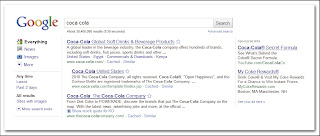
Your PPC campaigns should drive email registrations. Drive paid-search clicks to landing pages that capture email addresses and contact information. Having specific landing pages linked to different keyword categories will give you rich information about how and why a customer is visiting your Web site. For example, Coca-Cola turns a branded search query into an action that drives registrations for its My Coke Rewards loyalty program. (See Figure below)


Use PPC data to inform email strategies. Search data contains valuable information about customer intent that you can use to help target email content. You can customise your follow up emails based on the keyword ad that drives in a lead.

Use Email content to improve your website SEO. Marketers can repurpose email newsletters into regularly updated, keyword-rich site content, which search engines love. Boost your natural results by posting past issues of email newsletter to your site.

Test your offer value and copy on both Email and PPC. Seeing what message content, creative, or offers perform best in search can inform email executions and vice versa. Use customer search data to understand which ads appeal to different personas. Then customizes email communication streams based on that information.

Coordinate your campaign's message on both channels. Timing keyword buys with email messaging will promote email content and reinforce brand messages in multiple media. Crate and Barrel coordinates seasonal email promotion copy with its keyword investment. (See Figure below)


Integrated marketing has long been a goal of marketers. But it’s a good idea that rarely happens. I strongly believe you should start small to coordinate efforts. Starting small will requires simple changes to current programs with little incremental cost and can set interactive marketers up for broader integration.

Thursday, June 30, 2011

What is HTML, CSS and Javascript?

Right, quick post today...on a topic I feel will get your web development basics clear. Before diving into SEO techniques it is important to know what is HTML, CSS and Javascript? I have gone through countless checklists while trying to understand search engine optimization and every checklist says you should know the very minimal of HTML, how to code a basic website and so on. I'm not going to focus on the development bit, but what I do want to explain is how HTML, CSS and Javascript work together in web pages.

The three main technologies used to create web pages (HTML, CSS and JavaScript) each do different jobs.

  • HTML is used only for structuring content.
  • Cascading Style Sheets is used for applying all visual styles.
  • JavaScript is used for (almost) all interactive functionality, and should always be referenced in separate files, never written into HTML
How do these three technologies work together?

The web page you see in your browser may be a combination of structure, style and interactivity.

These jobs are undertaken by three different technologies, HTML, Javascript, and CSS which your browser knows how to interpret

HTML - marks the content up into different structural types, like paragraphs, blocks, lists, images, tables, forms, comments etc

CSS - tells the browser how each type of element should be displayed, which may vary for different media (like screen, print or handheld device)

JavaScript- tells the browser how to change the web page in response to events that happen (like clicking on something, or changing the value in a form input)


The 2 most important things to learn about web page production are:

1. Use the correct HTML tags that mean what they say. (When people talk about "semantic" HTML, this is what they mean!)

2. Keep your HTML, CSS and JavaScript code separate.(This simply means: Don’t put JavaScript or CSS in your HTML. Put them in separate files, called in by your HTML pages)

If you're interested to learn how to code your website or blog, I'd suggest the Basic HTML tutorial from w3schools, look no further.

Monday, June 13, 2011

Best Practice SEO Web Design Standards 2011

SEO is all about precision. For the most part I look at SEO like an orchestra, sure, each instrument can be played on their own, but the more you get better at optimizing your content, technical code and link building, the greater the impact. All of the SEO elements work together to frame the focus of the page, improving the SEO rankings.

This post is about the Best Practice SEO Web Design Standards. I would like to profusely thank Ania Franczak from Performance Media who has given me permission to publish her findings in this post. Below are the SEO standards to follow when designing or redesigning a website.

Highly Recommended Standards

● Do not use flash as one object containing a site, provide alternative HTML content with ‘progressive enhancement methodology’.

● Use JavaScript as an enhancement to the basic, fully functional HTML page.

● Enhance page only for capable browsers.

● Do not use session ids and dynamic parameters in URLs.

● Do not use frames.

● Do not create duplicate content.

● Create & maintain a site map for users and a separate compliant Google XML sitemap and submit it to the Google Webmaster Tools (and other search engine tools)

● Link to the user site map from every page.

● Keep URLs short; use keywords in URLs; keep URLs in local language.

● Limit number of directory levels to 2 or less.

● Page weight (in KB) should be as small as possible

● Optimize page opening time. Use Page Speed browser extension and Page Speed Online

● Use hosting and web analytics reporting solutions – Urchin, Google Analytics, Omniture, Webtrends, or Unica (you can use any depending upon your budget. Note – Google Analytics is a free tool. Rest all are paid tools)

● Plan SEO-compliant migration for redesign - use 301(permanent) redirects not 302 (temporary) redirect, use 404 response code for not existing pages and 503 response code when site is temporarily unavailable

● Use country in top level domain names, e.g. rediff.co.in, yahoo.co.uk. except for the US then use .com. Do not combine countries in one site.

● If the website needs to be mainly in Flash, make sure it is SEO-compliant using Progressive Enhancement providing alternative HTML content

● The best way to develop a site using rich content (Flash, JavaScript/Ajax, CSS) is to build it as a basic (safe) HTML site and enable rich content with Progressive Enhancement methodology

● Test cookies to ensure they do not limit Search Engine crawler access.

● Ensure robots.txt file allows Search Engine crawlers into website.

● Use Google Webmaster Tools to monitor problems encountered by search engine robot

Recommended Standards

● Create a preferred landing page (PLP) with relevant content for each of your GOLD keywords.

● Do not create microsites, unless the purpose is or is part of an SEO strategy.

● Use keywords in title tags.

● Build unique and descriptive titles up to 70 characters.

● Hide database driven site details from URLs.

● Do not use subdomains for new content on a site, use subdirectories instead.

● Use keywords in body text, use keywords in header tags (especially in H1 tag)

● Use keywords in meta descriptions, use keywords in image alt tags

● Limit number of directory levels to 3 or less

● Emphasize keywords with bold (stron tag) & italics (em tag)

● Create a 12 month refresh plan to update the site

● Ensure country selectors are search friendly ( allow crawlers into website) and safe (don’t allow crawlers to index content from another locale)

● Place important content closer to the site root and prevents spiders from seeing duplicate content. (use 301 redirects, meta robots tag/robots.txt file and rel=”canonical” tag)

● Use a CMS that allows SEO modifications to dramatically reduce SEM costs.

Failure to comply with these standards will result in poor search engine rankings & inability to remedy the issue without expensive, time-consuming, & unplanned re-work.